
Paid plans · One column
Developer resume template
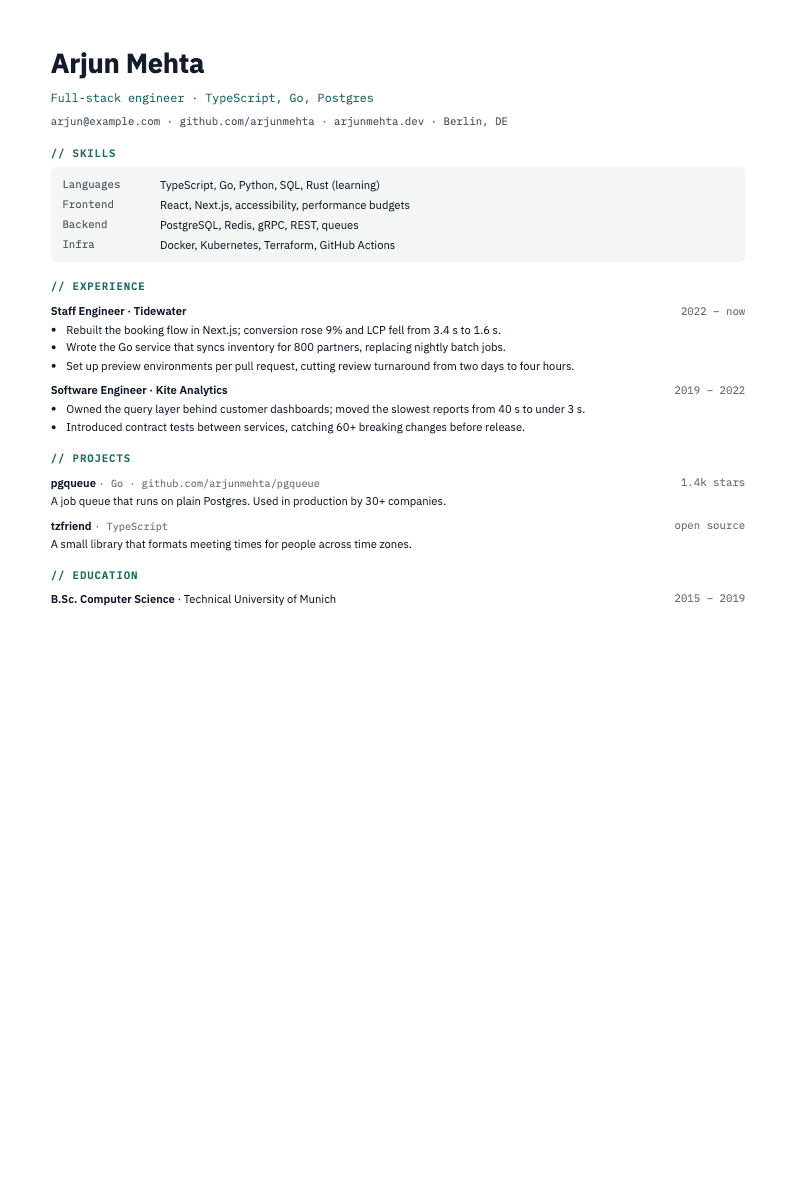
Developers are often hired on what they can do, so this template puts your skills and projects up front. It stays one column, uses monospace labels for a technical feel, and gives each project room to show a repository and what it does.
Who it is for
- Software engineers, from junior to staff
- People with open-source work or side projects worth showing
- Roles where your stack matters as much as your job titles
How it is laid out
- A grouped skills table at the top, such as Languages, Frontend, Backend and Infra
- Monospace section labels and an accent colour you can change
- Experience with short bullets and dates at the right edge
- A projects section with the repository, language and a one-line description
- Education at the end, kept short
Tips for this template
- Group skills by kind and list only what you would be happy to be asked about.
- For each project, say what it does and who uses it. Link the repository.
- Use real numbers where you have them, such as load time or cost. Never invent one.
- Name your stack in the bullets as well as in the skills table, so the keywords show up twice.
Worth knowing
The Developer template is on paid plans. You can start free, try the free templates, and move up when you want it. Its section labels carry a "//" prefix as styling, so check the finished file with the free ATS checker.
Common questions
Is the Developer template free?
No. It is included with paid plans. The free plan has other templates, such as ATS Classic and Compact.
Can I change the colour?
Yes. The accent colour is adjustable.
Does it work for non-developers?
It is built around skills and projects, so it suits technical roles best. For other roles, ATS Classic or Compact is a better fit.